Text to Pay

Skip the phone calls and manage your loan payments the simple way — by text. Enroll in our Text to Pay (SMS) service and take control of your payments whenever and wherever it’s convenient for you.

Payments at Your Fingertips

  • Anytime, anywhere payments — available 24/7, 365 days a year
  • Full control — opt in or out of text notifications at any time
  • No phone call needed — handle everything with just a few texts
  • Pay via ACH

Getting Started: Opt-In & Enrollment

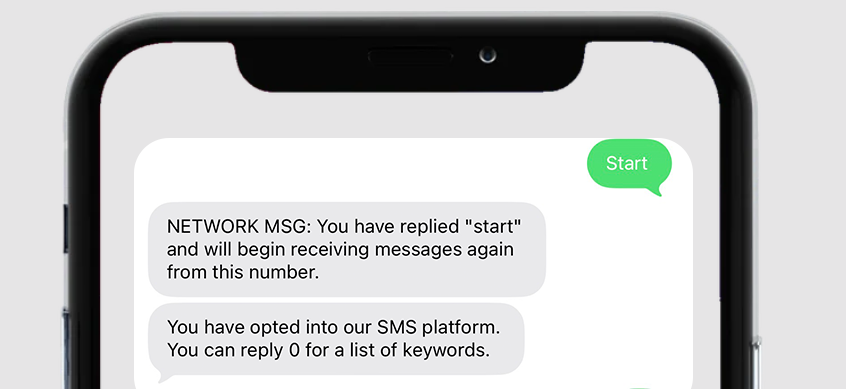
Text “START” to 833.833.1083

Start

Text “Start” to  (833)833-1083


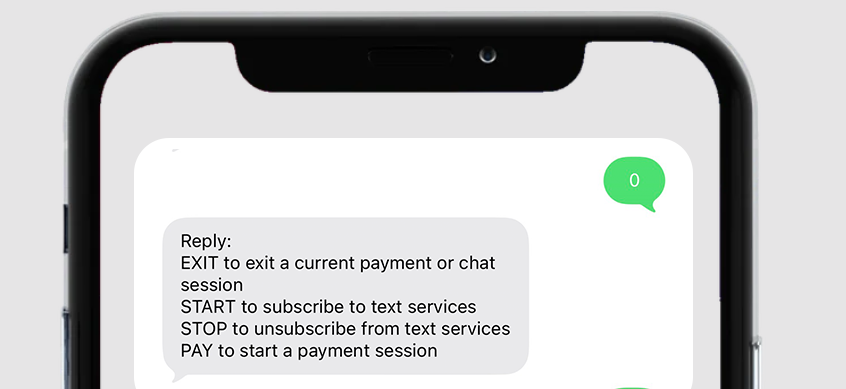
Access Menu

Access the menu by texting “0”.


Pay

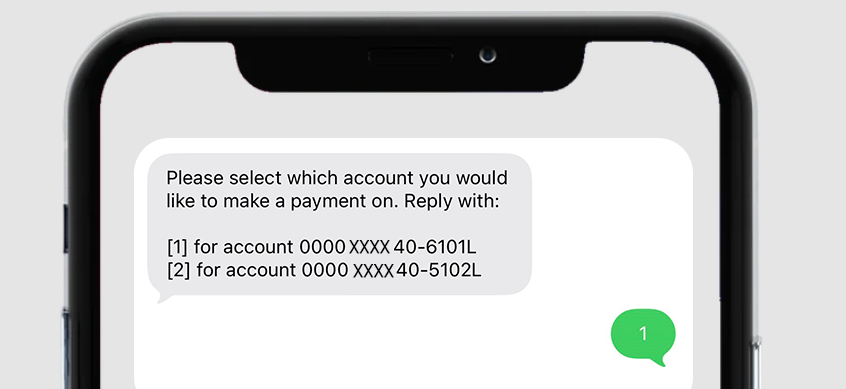
Reply “Pay” to initiate the payment, and “1” to authorize.

You’ll receive a confirmation message when the transaction is successful.


Text-to-Pay Frequently Asked Questions

After opting into the text payment service, you will receive a the option to make a loan payment. You will respond “Pay” to the text. You will then be asked to confirm the payment amount and which payment method you wish to use.

NOTE: You must have payment methods already stored on file with us to use them for text payments.

Yes, we use the latest industry-standard compliance protocols and encryption tools to safely collect, store, transmit, and protect all payment information.

After you authorize the payment you will receive a text confirmation if successful. This is your payment receipt.

The payment will post to your account by the end of the day.

You may opt out of receiving text messages at any time by responding “STOP”. If you opt out of text payments, you may still pay using our other convenient channels.

You can text “START” to re-enroll in text payments.

Standard data and message rates may apply through your phone provider. Please contact your wireless provider if you have any questions about your text plan.

No, but you can visit Loan XPress Pay to make a payment online.